Most people on the free version of ChatGPT are using Terra, the middle model — and for everyday tasks like emails, recipes, and questions, Terra is more than enough. Paid users can switch between all three. Sol is the most powerful and is worth choosing only for genuinely complex work. Luna is the fastest option for quick, simple questions.
On 9 July 2026, OpenAI released GPT-5.6 — at the time the newest version of ChatGPT — with a new naming system that confused a lot of people. Instead of a number like "GPT-4" or a letter like "GPT-4o," there are suddenly three models with celestial names: Sol, Terra, and Luna. (OpenAI has since released a newer flagship, GPT-6 Astra, in September 2026 — see our news on what GPT-6 Astra changes if you're on a paid plan. Note that OpenAI also made Luna, not Terra, the default for Free and Go accounts starting in August 2026 — see is ChatGPT free? for the current free-tier default.)
Sun. Earth. Moon.
That naming is not random. It is actually a pretty good way to understand what each model is for — and which one you are already using.
Why Sun, Earth, and Moon?
Think of the three names as a size and brightness scale. Sol (the sun) is the biggest and most powerful. Terra (the earth) is the comfortable middle ground where most of us live. Luna (the moon) is smaller and faster, good enough for many tasks but not as capable as the others.
OpenAI chose this metaphor deliberately: the three models are different versions of the same underlying system, just optimized for different trade-offs between speed, cost, and depth of thinking.
The Three Models at a Glance
Here is what each one does in plain English — no benchmarks, just real-world examples of where each one shines.
| Sol ☀️ | Terra 🌍 | Luna 🌙 | |
|---|---|---|---|
| Best described as | The deep thinker | The all-rounder | The quick responder |
| Speed | Slower | Comfortable | Fastest |
| Great for | Complex analysis, long documents, research, coding | Emails, recipes, planning, explaining things, most everyday tasks | Simple questions, quick translations, short to-do lists |
| Not ideal for | Quick back-and-forth chat | Very long multi-step technical work | Anything that needs careful reasoning |
| Who gets it | Paid plans only (Plus, Pro, Business, Enterprise) | Everyone — it is the default for Free and Go | Paid plans only |
| Special features | Optional "max reasoning effort" and Ultra mode (see FAQ) | None needed | None needed |
The honest summary: Terra handles the vast majority of what people actually use ChatGPT for. The gap between Terra and Luna matters more than the gap between Terra and Sol for most readers of this site.
Which Model Do I Have Right Now?
The model you have depends on your ChatGPT plan.
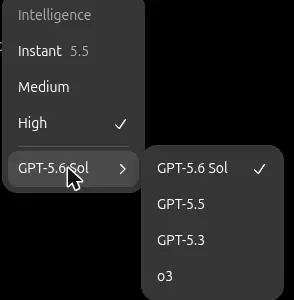
The model menu on a ChatGPT Plus account — our own screenshot, 31 July 2026.
If you use ChatGPT for free: You have Terra. You do not need to do anything to set it up — it is the default for free accounts. You will not see a model picker in your interface; Terra is what runs when you open ChatGPT and start typing.
If you pay for ChatGPT Plus, Pro, Business, or Enterprise: You can choose. Look for a model selector — usually a small dropdown near the top of the chat window or next to the text box.
Here is how to check, step by step:
- Open ChatGPT at chatgpt.com (or the app on your phone)
- Start a new conversation
- Look at the top of the screen — if you see a name like "ChatGPT" with a small arrow next to it, tap or click it
- A menu will appear. If you only see one option (Instant) — or no menu appears at all — you are on the free plan, which uses a fast default model for everyday questions. If you are on a paid plan (Plus, Pro, Business, or Enterprise), you will see additional choices labelled Medium, High, and possibly Extra High or Pro. These represent different levels of reasoning effort, all powered by GPT-5.6 Sol. Medium is the right choice for most tasks; reserve High or Extra High for lengthy documents, detailed analysis, or complex multi-step problems.
Do I Need to Pay to Get a Better Model?
For most people: no.
Terra, the free default, handles everyday tasks very well. Writing emails, explaining documents, brainstorming ideas, drafting a letter to a company, finding a recipe from what you have in the fridge — Terra does all of this reliably.
Where Sol becomes genuinely worth considering:
- You are doing something that requires careful, multi-step reasoning — reviewing a contract clause by clause, asking for a detailed analysis of a medical summary before a doctor's appointment, working through a complex financial decision
- You regularly upload long documents (research papers, lengthy reports) and need careful, thorough responses
- You are using ChatGPT for work in a technical field like software, law, or finance
Where Luna is the right choice (for paid users):
- You are on a paid plan and want the fastest possible response for a simple question
- You are in a rapid back-and-forth where depth does not matter — brainstorming names for something, translating a short sentence, getting a quick definition
If you are on the free plan and Terra feels slow or limited for what you need, it is worth reading Is ChatGPT Free? What You Get Without Paying and Is ChatGPT Plus Worth It? before deciding.
What About the New Voice Mode?
GPT-5.6 also introduced an updated version of ChatGPT's voice feature, now called GPT-Live. It lets you have a real back-and-forth spoken conversation with ChatGPT — more like talking to a person than dictating commands to a phone.
We have a separate guide that covers it in detail: ChatGPT Voice Mode: How to Use It and What It Is Good For.
What to Try Next
If you are new to ChatGPT and want to get comfortable with the basics first, What Is ChatGPT? A Plain-English Guide for Beginners is the best starting point. Once you are ready to actually send your first message, How to Use ChatGPT: Step-by-Step for First-Timers walks you through the whole thing. And if you are wondering how ChatGPT stacks up against Google's AI, ChatGPT vs Gemini gives you an honest side-by-side comparison.
Sources
- GPT-5.6: Frontier intelligence that scales with your ambition — OpenAI
- Models reference — OpenAI
- ChatGPT plans and pricing — OpenAI